 whisper4aegisub

Whisper for Aegisub Professional Local AI Subtitle Transcription
FINALLY, a Whisper solution ANYONE can actually use!
Generate high-quality subtitles using OpenAI Whisper directly on your computer with Aegisub.
No subscriptions. No accounts. No monthly fees.
100% Local, No Cloud, No Uploads.
Your media never leaves your machine.


Key Features
It enables fast and accurate transcription of audio and video files, making subtitle creation significantly more efficient and less time-consuming.
The tool is designed with subtitle editors in mind, focusing on reliability, precision, and seamless workflow integration. By automating transcription while preserving full control over timing and text editing, whisper4Aegisub helps creators focus on quality rather than repetitive manual work.
Built for flexibility and real-world use, whisper4Aegisub supports modern subtitle workflows and adapts easily to different languages, content types, and project sizes.
Download Now FREE Get FREE Trial 7 days
Local AI transcription (privacy-first)
- Runs 100 % locally on your machine
- No uploads. No cloud. No data sharing.
- Perfect for studios and professionals who can’t risk data leaks.
We all know the risks. You upload your media for AI processing and you never know what happens to it.
Now the power is truly in your hands.

Massive language support
Supports all languages that Whisper supports
Ideal for:
- international creators
- documentaries
- interviews
- multilingual content
- all types of content creators

Superior transcription quality
More accurate than:
- online transcription services
- built-in Premiere Pro captions
- DaVinci Resolve transcription
Tested and compared against multiple tools.
Hands-down, Whisper is one of the best AI transcription tools available.
And now you can use it too, no geek skills required.

Ridiculously easy to use
- Open audio/video directly in Aegisub
- Click: Automation → AI Transcription → Start
- No exports, no imports, no extra tools.
Easy to use interface: just select the language and model size, then transcribe.
Just keep in mind: using larger models (ex. large-v3) gives you more accurate results but needs more processing time.

Plug & Play installation
- Use the installer or drop the plugin into the Aegisub plugins folder
- Start transcribing immediately
- No accounts, no setup, no login.
No rocket science. No hassle.
The whisper4aegisub plugin has everything setup for you, ready to go.
There is no worrying about the right Python version, installing the right libraries and so on. Just install or copy/paste and use it right away ;)

Professional subtitle editing
Built on top of Aegisub, the most powerful free subtitle editor
Full control over:
- timing
- styling
- formats
Perfect for broadcast-ready subtitles.

Native subtitle formats
Export subtitles in formats Aegisub already supports:
- .srt
- .ass
- .ssa
- and many others...
No conversions, no compatibility issues.

Simple & Fair pricing
Free: unlimited transcriptions of media files of up to 60 seconds in length
- Perfect for TikTok, Instagram Reels & YouTube Shorts
Pro license: $14.99 one-time
- Unlimited transcription length
- Lifetime license
- Up to 3 machines
No subscriptions. No monthly fees.
You can also try the full version free for 7 days before buying.

Affiliate program
Earn 30% commission on every sale
Ideal for:
- YouTubers
- subtitle creators
- educators
- creators in general

Subtitles = better performance
YouTube:
- better SEO
- better discoverability
- higher watch time
Short-form platforms:
- higher retention
- more views without sound
- better engagement

"It just WORKS!"
Whether you have a "state-of-the-art" machine or a 10+ years old computer... whisper4aegisub has you covered.
It was tested on computers with 10+ years of age (Win10) and the transcription process with the largest model available (large-v3) completed smoothly with no problems.
Just keep in mind that the processing power does make a difference and on older computers the transcription might take longer to complete.



Supported Languages
Ready? Take a deep breath... Here we go!
English, Spanish, German, French, Italian, Slovenian, Croatian, Serbian, Afrikaans, Amharic, Arabic, Assamese, Azerbaijani, Bashkir, Belarusian, Bengali, Breton, Bosnian, Bulgarian, Catalan, Chinese, Cantonese, Czech, Danish, Dutch, Estonian, Basque, Persian, Finnish, Faroese, Galician, Gujarati, Hausa, Hawaiian, Hebrew, Hindi, Hungarian, Icelandic, Indonesian, Javanese, Georgian, Kazakh, Khmer, Kannada, Korean, Latin, Luxembourgish, Lingala, Lao, Lithuanian, Latvian, Malagasy, Maori, Macedonian, Malayalam, Mongolian, Marathi, Malay, Maltese, Myanmar, Nepali, Norwegian Nynorsk, Norwegian, Occitan, Punjabi, Polish, Pashto, Portuguese, Romanian, Russian, Sanskrit, Sindhi, Sinhala, Slovak, Shona, Somali, Albanian, Sundanese, Swedish, Swahili, Tamil, Telugu, Tajik, Thai, Turkmen, Tagalog, Turkish, Tatar, Ukrainian, Urdu, Uzbek, Vietnamese, Yiddish, Yoruba, Haitian Creole, Tibetan, Somali, Hausa, Bashkir, Assamese … and many more.
Download Now FREE Get FREE Trial 7 daysComparison
| Feature | Whisper for Aegisub | SaaS | Premiere / Resolve |
|---|---|---|---|
| Offline | ✅ | ❌ | ✅ |
| Privacy | ✅ | ❌ | ❓ |
| One-time payment | ✅ | ❌ | ❌ |
| Subtitle quality | ⭐⭐⭐⭐⭐ | ⭐⭐⭐ | ⭐⭐⭐ |
| Subtitle editing | ⭐⭐⭐⭐⭐ | ⭐⭐ | ⭐⭐⭐ |
| Long files | ✅ | 💲💲💲 | ✅ |
Supported Audio & Video Formats


How to use
Installation
- Download and install Aegisub (if you haven't already) from here:
https://aegisub.org/ - Download the latest version of whisper4aegisub
- Extract it
- Double click the automatic installer or copy all the contents into this folder (replace {USERNAME} with your username):
C:\Users\{USERNAME}\AppData\Roaming\Aegisub\ - Restart Aegisub
Usage
- In Aegisub open a video
Video → Open Videoor audioAudio → Open Audio - Then in Aegisub open:
Automation → AI Transcription - Select a language
- Select a model (large-v3 is recommended for best accuracy)
- Set other settings by your preference
- Press
Startto start transcribing - A cmd window will pop up, showing the process
- Once the job is done the subtitles will be automatically loaded into Aegisub, ready for further editing
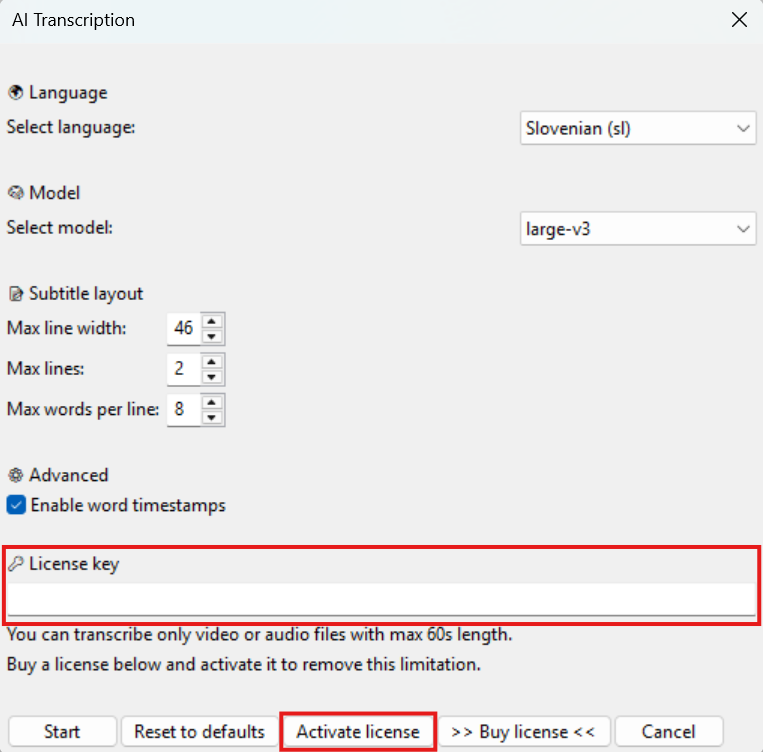
Activation
- In Aegisub open:
Automation → AI Transcription - Enter your license key into the license input
- Click
Activate license - Your license key will be checked
- Congratulations! You're now ready to go in full pro mode!
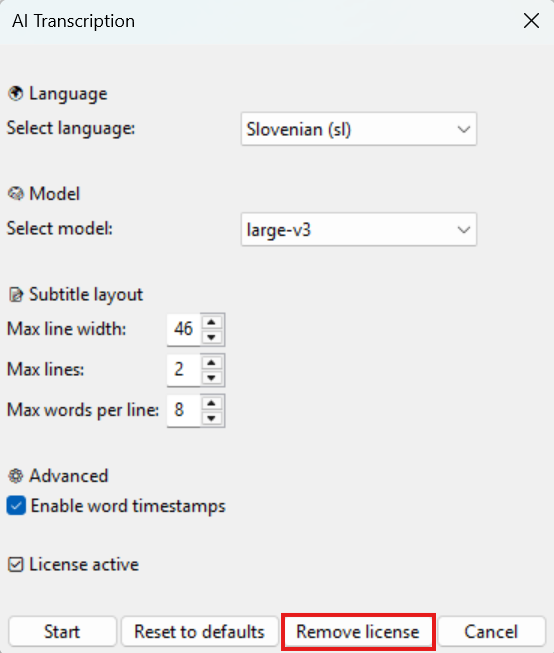
Deactivation
You can use your license key for 3 machines. But if you ever want to transfer your license to another machine, we've got you covered.
- In Aegisub open:
Automation → AI Transcription - Click
Remove license - Your license key will be removed and you can now use it on another machine
Enable GPU (3-5x faster)
To enable GPU acceleration and get your transcription processes 3-5x faster just follow these steps:
- Check your graphics card model (must be from Nvidia Geforce RTX series)
- Update drivers for your graphics card
- Install CUDA Toolkit 12.8 Update 1
- Install cuDNN 9 for CUDA 12
Pricing
🆓 Free (no license required)
- Transcribe files with max 60 seconds in length
- Perfect for:
- YouTube Shorts
- TikTok videos
- Instagram Reels
- Short clips & previews
- If a longer file is opened, only the first 60 seconds will be transcribed.
💎 Commercial License
Unlock unlimited transcription for just $14.99 one-time payment:
- No time limits
- One-time payment
- Use forever
- No subscriptions
- No accounts
Ideal for:
- YouTubers
- Filmmakers
- Editors
- Agencies
- Archivists
- Sessions / teachings
You can also try the full version free for 7 days before buying.
🚀 Get FREE Trial!
Try the Full Version for Free!
Get unlimited transcriptions for 7 days with the complete feature set.
Full Whisper accuracy, full Aegisub integration, fully local processing.
Just click the button below and choose the "Free Trial" option.
Affiliate Program Earn 30%
Be Part of the Local AI Movement — Earn 30% per Referral
Help your audience save time and protect privacy with whisper4aegisub — a plug-and-play, offline AI transcription plugin — and earn a solid commission for every referral.
No subscriptions, no cloud, no headaches — just a tool people love, and a reward for sharing it.
Grow your reach, monetize your influence, and be part of a creator-first ecosystem.
Frequently Asked Questions
It was tested also on machines with 10+ years of age (Win10) and the processes with the largest model large-v3 completed smoothly with no problems whatsoever.
But of course, the process might be a bit slower.
- tiny / base / small: Fast and lightweight, good for quick rough subtitles.
- medium: Great balance of speed and accuracy — often the sweet spot.
- large-v1 / large-v2 / large-v3: Highest transcription accuracy but much slower and more memory-intensive.
Choose based on how much accuracy you need and how long you’re willing to wait.
whisper4aegisub supports all languages supported by OpenAI Whisper — over 100 languages:
English, Spanish, German, French, Italian, Slovenian, Croatian, Serbian, Afrikaans, Amharic, Arabic, Assamese, Azerbaijani, Bashkir, Belarusian, Bengali, Breton, Bosnian, Bulgarian, Catalan, Chinese, Cantonese, Czech, Danish, Dutch, Estonian, Basque, Persian, Finnish, Faroese, Galician, Gujarati, Hausa, Hawaiian, Hebrew, Hindi, Hungarian, Icelandic, Indonesian, Javanese, Georgian, Kazakh, Khmer, Kannada, Korean, Latin, Luxembourgish, Lingala, Lao, Lithuanian, Latvian, Malagasy, Maori, Macedonian, Malayalam, Mongolian, Marathi, Malay, Maltese, Myanmar, Nepali, Norwegian Nynorsk, Norwegian, Occitan, Punjabi, Polish, Pashto, Portuguese, Romanian, Russian, Sanskrit, Sindhi, Sinhala, Slovak, Shona, Somali, Albanian, Sundanese, Swedish, Swahili, Tamil, Telugu, Tajik, Thai, Turkmen, Tagalog, Turkish, Tatar, Ukrainian, Urdu, Uzbek, Vietnamese, Yiddish, Yoruba, Haitian Creole, Tibetan, Somali, Hausa, Bashkir, Assamese … and many more.

How to get in touch

Hey there :)
My name is Danijel Latin and I'm the creator of whisper4aegisub.
I'm a content creator myself and constantly in search for easier solutions to help me with creating my multimedia content.
But if I don't find them, I develop them.
Thus, the solution whisper4aegisub was developed.
If you have any issues or you perhaps found a bug, please don't hasitate to contact me on my github repo page and report an issue:
Become an Affiliate
You love this product. You also know a lot of people that would love it too.
Why not make some money out of it?
Become an affiliate and earn 30% from every purchase made through you.